
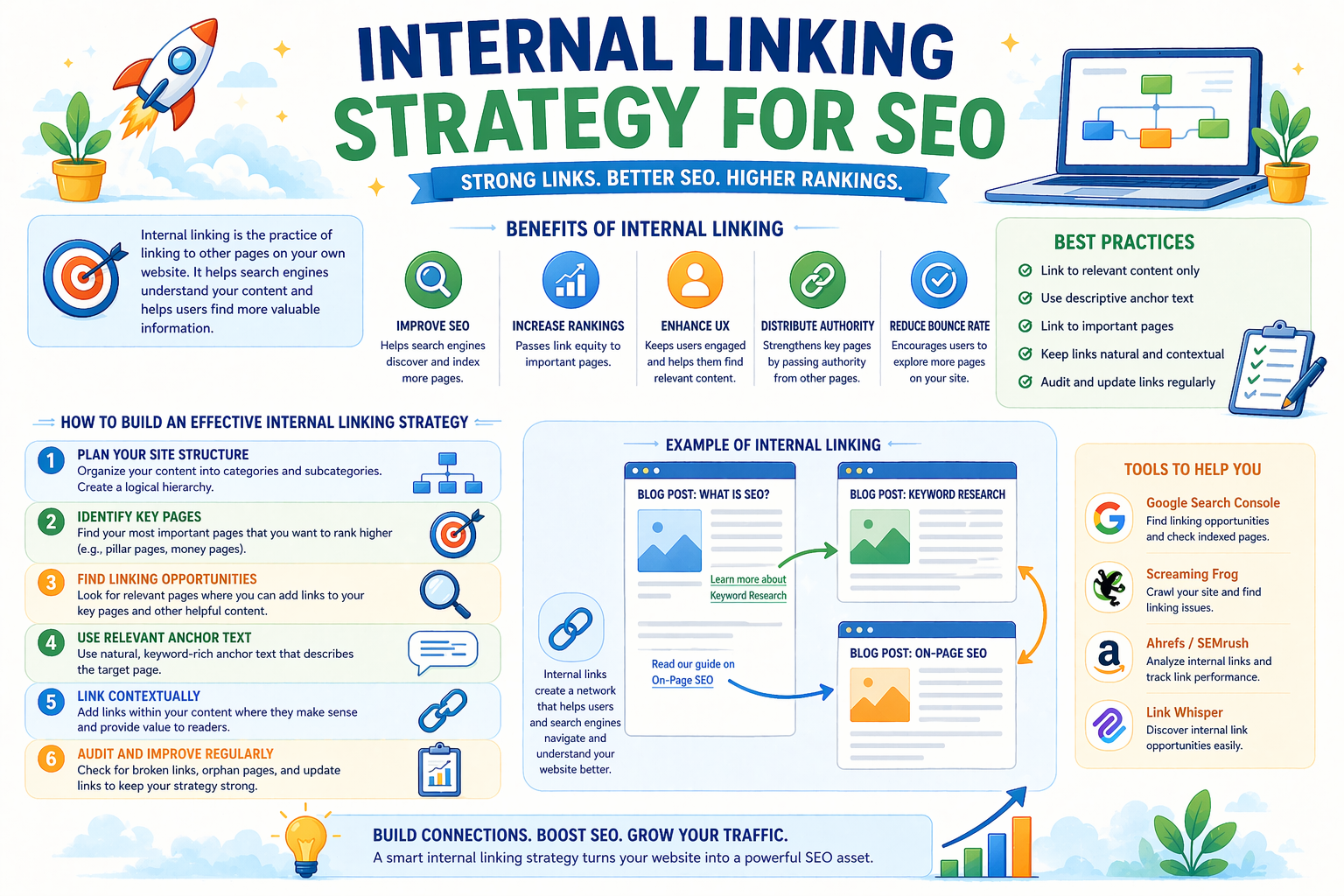
Internal linking is one of the most powerful yet often overlooked SEO strategies. It involves linking one page of your website to another page within the same website. These links help search engines understand your content structure and guide users to relevant information.
A strong internal linking strategy improves website navigation, increases page authority, and helps important pages rank higher in search results.
In simple terms, internal linking connects your website pages and helps both users and search engines find content easily.
What is Internal Linking?
Internal linking refers to links that connect pages within the same website.
For example:
- Linking a blog post to a service page
- Linking related blog articles
- Linking category pages to product pages
These links help search engines crawl your website and distribute ranking power across pages.
Why Internal Linking is Important for SEO
Internal linking plays a major role in website optimization and search engine rankings.
Key Benefits of Internal Linking
Improves Search Engine Rankings
Internal links help search engines understand which pages are important.
Enhances User Experience
Visitors can easily navigate between related pages.
Increases Page Authority
Internal links pass authority from one page to another.
Reduces Bounce Rate
Users stay longer on your website.
Improves Website Structure
Search engines can crawl and index pages more efficiently.
Types of Internal Links
Understanding different types of internal links helps build a better SEO strategy.
1) Navigational Links
These links appear in menus and navigation bars.
Examples:
- Home
- Services
- About Us
- Contact
They help users navigate your website.
2) Contextual Links
These links appear within content.
Example:
If you write a blog about SEO, you can link to:
- SEO services page
- Keyword research blog
- Website optimization guide
Contextual links are the most valuable for SEO.
3) Footer Links
Footer links appear at the bottom of a webpage.
Examples:
- Privacy policy
- Sitemap
- Important pages
They help users access key information.
How Internal Linking Helps Search Engines
Search engines use internal links to understand your website.
Internal links help search engines:
- Discover new pages
- Understand page relationships
- Identify important pages
- Improve indexing
- Distribute ranking authority
Without internal links, some pages may not be found by search engines.
Best Internal Linking Strategies for SEO
Follow these proven strategies to improve SEO performance.
1) Link to Relevant Pages
Always link to pages related to the content topic.
Example:
A blog about digital marketing can link to:
- SEO services
- Social media marketing
- Content marketing
Relevant links improve user experience.
2) Use Descriptive Anchor Text
Anchor text is the clickable text in a link.
Good example:
Learn more about SEO services
Bad example:
Click here
Descriptive anchor text helps search engines understand the page.
3) Link to Important Pages
Focus on linking to pages that generate leads or conversions.
Examples:
- Service pages
- Contact page
- Pricing page
- Landing pages
These pages should receive more internal links.
4) Maintain a Logical Website Structure
Organize your website into clear categories.
Example structure:
Home
Services
Blog
Contact
A simple structure improves navigation and SEO.
5) Add Internal Links to New Content
Whenever you publish a new blog post, link it to existing content.
This helps search engines discover new pages quickly.
6) Update Old Content with New Links
Regularly update older blog posts with links to newer content.
This improves rankings and keeps content relevant.
7) Avoid Too Many Links on One Page
Too many links can confuse users and reduce SEO value.
Recommended:
- 3 to 10 internal links per article
Balanced linking improves performance.
Internal Linking Best Practices
Follow these best practices for effective internal linking.
- Link to relevant content
- Use clear anchor text
- Keep links natural
- Avoid broken links
- Maintain consistent structure
- Update links regularly
- Focus on important pages
These practices help improve rankings.
Common Internal Linking Mistakes to Avoid
Avoid these mistakes when building internal links.
- Using generic anchor text
- Linking to unrelated pages
- Ignoring important pages
- Creating broken links
- Using too many links
- Not updating old content
Fixing these mistakes improves SEO.
How Many Internal Links Should You Use?
The number of internal links depends on content length.
General Guidelines
Short article:
2 to 3 links
Medium article:
3 to 5 links
Long article:
5 to 10 links
Focus on quality rather than quantity.
Simple Internal Linking Example
Here is a simple example of internal linking.
Blog Topic:
Digital Marketing Strategy
Internal Links:
- SEO services
- Social media marketing
- Content marketing
- Website design services
This structure helps search engines understand relationships between pages.
Frequently Asked Questions (FAQs)
What is internal linking in SEO?
Internal linking is the process of linking one page of a website to another page within the same website. It helps search engines understand website structure and improves navigation.
Why is internal linking important?
Internal linking improves SEO rankings, helps users navigate easily, and increases page authority.
How many internal links should a page have?
Most pages should include:
- 3 to 10 internal links
The exact number depends on content length.
Does internal linking improve SEO?
Yes. Internal linking helps search engines crawl pages, distribute authority, and improve rankings.
What is anchor text in internal linking?
Anchor text is the clickable text used in a hyperlink. It should describe the linked page clearly.
Conclusion
Internal linking is a simple yet powerful SEO strategy that improves website structure, enhances user experience, and boosts search engine rankings.
By building a strong internal linking strategy and following best practices, businesses can improve visibility, increase traffic, and achieve long-term growth.