
Introduction
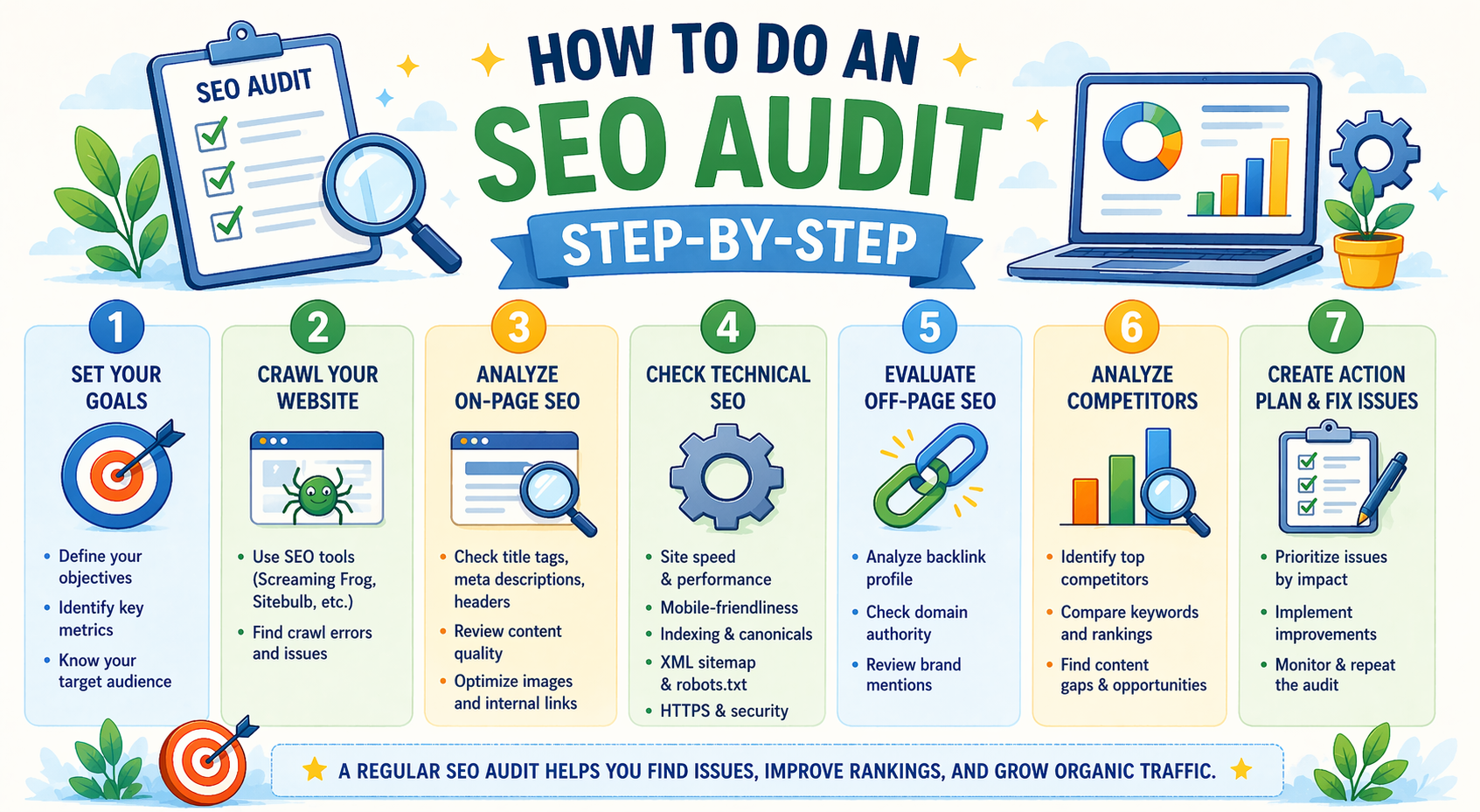
An SEO audit is a comprehensive evaluation of your website to identify issues that may affect its performance in search engines. Regular SEO audits help businesses improve rankings, increase website traffic, and provide a better user experience.
Whether you run a digital marketing website, service business, or blog, conducting an SEO audit ensures your website follows best practices and stays competitive.
In simple terms, an SEO audit helps you find problems and fix them to improve your website’s visibility on Google.
What is an SEO Audit?
An SEO audit is the process of analyzing a website to evaluate its search engine optimization performance. It identifies technical issues, content problems, and optimization gaps that may prevent a website from ranking well.
An SEO audit typically reviews:
- Website structure
- Content quality
- Keyword usage
- Website speed
- Mobile responsiveness
- Backlinks
- Technical SEO issues
Why is an SEO Audit Important?
Regular SEO audits help maintain website health and improve performance.
Key Benefits of an SEO Audit
- Improves search engine rankings
- Identifies technical issues
- Enhances user experience
- Increases website traffic
- Helps fix SEO errors
- Supports long-term growth
Businesses that perform regular SEO audits often see better results in search engine rankings.
How Often Should You Perform an SEO Audit?
The frequency of SEO audits depends on your website size and activity level.
Recommended Schedule
- Small websites — Every 6 months
- Business websites — Every 3 to 6 months
- Large websites — Every 3 months
- After major website updates
- When traffic drops
Regular audits keep your website optimized.
Step-by-Step SEO Audit Process
Follow this simple process to perform an effective SEO audit.
Step 1: Check Website Visibility in Search Engines
First, confirm that your website is indexed by search engines.
How to Check
Search on Google:
site:yourwebsite.com
This shows how many pages are indexed.
What to Look For
- Pages indexed correctly
- Missing pages
- Duplicate pages
Indexing issues can affect rankings.
Step 2: Analyze Website Traffic
Understanding traffic helps identify performance issues.
Metrics to Review
- Total visitors
- Traffic sources
- Top-performing pages
- Bounce rate
- Conversion rate
Traffic analysis helps measure SEO success.
Step 3: Check Website Speed
Website speed is an important ranking factor.
Slow websites can reduce rankings and increase bounce rates.
What to Check
- Page load time
- Image size
- Server response time
- Mobile performance
Ideal Speed
- Under 3 seconds
Fast websites provide better user experience.
Step 4: Review Mobile-Friendliness
Most users access websites through mobile devices.
Google prioritizes mobile-friendly websites.
What to Check
- Responsive design
- Text readability
- Button size
- Navigation usability
Mobile optimization improves rankings.
Step 5: Evaluate On-Page SEO
On-page SEO ensures your content is properly optimized.
Check These Elements
- Title tags
- Meta descriptions
- Headings (H1, H2, H3)
- Keyword usage
- Image alt text
- Internal links
Proper on-page SEO improves visibility.
Step 6: Check Website Content Quality
High-quality content is essential for SEO success.
Review Content For
- Relevance
- Readability
- Keyword optimization
- Original content
- Updated information
Fresh and useful content improves rankings.
Step 7: Check Broken Links
Broken links negatively affect user experience and SEO.
Types of Broken Links
- Internal links
- External links
- Missing pages (404 errors)
Fixing broken links improves website health.
Step 8: Analyze Backlinks
Backlinks are links from other websites pointing to your site.
They play a major role in search engine rankings.
What to Check
- Number of backlinks
- Quality of backlinks
- Spam links
- Referring domains
High-quality backlinks improve authority.
Step 9: Review Technical SEO
Technical SEO ensures search engines can crawl and index your website properly.
Check Technical Elements
- XML sitemap
- Robots.txt file
- HTTPS security
- URL structure
- Duplicate content
- Crawl errors
Technical SEO is essential for ranking.
Step 10: Monitor Keyword Rankings
Tracking keyword rankings helps measure SEO performance.
What to Monitor
- Keyword position
- Traffic from keywords
- Ranking changes
- Competitor rankings
Regular monitoring helps improve strategy.
Common SEO Audit Mistakes to Avoid
Avoid these mistakes during an SEO audit.
- Ignoring mobile optimization
- Skipping technical SEO checks
- Not updating content
- Focusing only on keywords
- Ignoring user experience
- Not fixing broken links
Fixing these mistakes improves results.
SEO Audit Checklist
Use this checklist during your audit.
- Website indexed properly
- Website speed optimized
- Mobile-friendly design
- Proper title tags and meta descriptions
- High-quality content
- No broken links
- Secure HTTPS connection
- Updated sitemap
- Strong backlinks
- Keyword rankings monitored
This checklist helps ensure a complete audit.
Frequently Asked Questions (FAQs)
What is an SEO audit?
An SEO audit is a process of evaluating a website to identify issues that affect search engine rankings and performance.
How long does an SEO audit take?
A basic SEO audit can take:
- Small website — 2 to 4 hours
- Medium website — 1 to 2 days
- Large website — Several days
The time depends on website size.
Can I do an SEO audit myself?
Yes. Many basic SEO audits can be performed using simple tools and checklists.
However, professional audits may provide deeper insights.
How often should I perform an SEO audit?
Most businesses should perform an SEO audit every:
- 3 to 6 months
- After major updates
- When traffic drops
Regular audits maintain performance.
What tools are used for an SEO audit?
Common SEO audit tools include:
- Google Search Console
- Google Analytics
- Website speed tools
- SEO analysis tools
- Keyword tracking tools
These tools help identify issues quickly.
Conclusion
An SEO audit is essential for maintaining website performance and improving search engine rankings. It helps identify problems, fix errors, and optimize your website for better visibility.
By conducting regular SEO audits and following best practices, businesses can improve traffic, enhance user experience, and achieve long-term growth.