
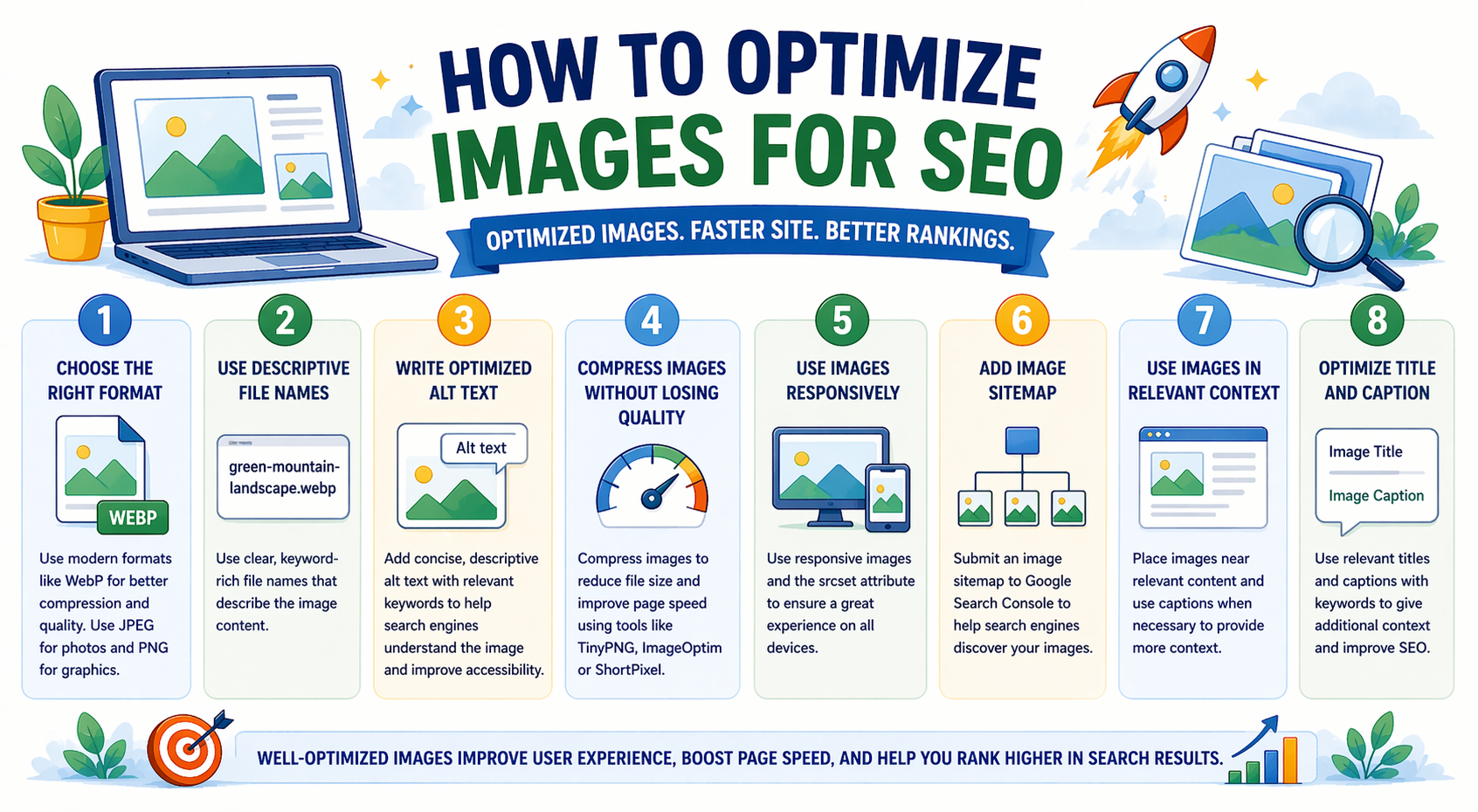
Images play a vital role in website design and user experience. They make content more engaging, improve readability, and help explain information visually. However, large or unoptimized images can slow down your website and negatively affect search engine rankings.
Image optimization is an important part of SEO because search engines consider website speed, user experience, and accessibility when ranking pages. Properly optimized images can improve loading speed, increase traffic, and help your website rank higher on Google.
In simple terms, optimizing images helps your website perform better and attract more visitors.
What is Image Optimization in SEO?
Image optimization is the process of reducing image file size and improving image quality without affecting performance. It also involves using proper file names, formats, and descriptions so search engines can understand the image.
Image optimization includes:
- Compressing images
- Choosing the correct file format
- Adding alt text
- Using descriptive file names
- Improving loading speed
These steps help improve both SEO and user experience.
Why Image Optimization is Important for SEO
Optimizing images provides several benefits for website performance and search engine rankings.
Key Benefits
Improves Website Speed
Smaller image sizes load faster, improving page speed.
Enhances User Experience
Fast-loading pages keep visitors engaged.
Supports Search Engine Rankings
Google considers page speed as a ranking factor.
Reduces Bounce Rate
Users stay longer on fast websites.
Improves Accessibility
Alt text helps visually impaired users understand images.
How Images Affect Website Speed
Large images are one of the most common reasons for slow websites.
When images are not optimized:
- Pages load slowly
- Users leave quickly
- Rankings may drop
- Mobile performance decreases
Optimized images improve performance and reduce loading time.
Best Image Formats for SEO
Choosing the right image format is important for performance.
JPEG (JPG)
Best for:
- Photographs
- Large images
- Website banners
Benefits:
- Smaller file size
- Good quality
PNG
Best for:
- Logos
- Graphics
- Images with transparency
Benefits:
- High quality
- Clear details
WebP
Best for:
- Modern websites
- Fast-loading pages
Benefits:
- Smaller file size than JPG and PNG
- Better performance
WebP is widely recommended for SEO.
How to Optimize Images for SEO (Step-by-Step)
Follow these steps to optimize images effectively.
Step 1: Use the Right Image Size
Always resize images before uploading them to your website.
Recommended sizes:
- Blog images: 800 to 1200 pixels width
- Thumbnails: 150 to 300 pixels
- Banners: 1200 to 1920 pixels
Avoid uploading very large images.
Step 2: Compress Images
Image compression reduces file size without losing quality.
Compression helps:
- Improve page speed
- Reduce loading time
- Save storage space
Use compression before uploading images.
Step 3: Use Descriptive File Names
File names help search engines understand images.
Bad example:
IMG12345.jpg
Good example:
digital-marketing-services.jpg
Always use clear and relevant file names.
Step 4: Add Alt Text (Alternative Text)
Alt text describes an image to search engines and users.
Example:
Alt text:
Digital marketing team working on SEO strategy
Alt text helps:
- Improve SEO
- Support accessibility
- Improve image search ranking
Step 5: Use Image Captions
Captions provide additional context for images.
Example:
Caption:
SEO dashboard showing website traffic growth
Captions help users understand the image quickly.
Step 6: Use Responsive Images
Responsive images automatically adjust to different screen sizes.
This improves:
- Mobile performance
- User experience
- Page speed
Responsive design is essential for modern websites.
Step 7: Enable Lazy Loading
Lazy loading loads images only when users scroll to them.
Benefits:
- Faster initial page load
- Better performance
- Improved SEO
Lazy loading is widely used on modern websites.
Step 8: Use Image Sitemaps
Image sitemaps help search engines discover images.
They improve:
- Image indexing
- Search visibility
- SEO performance
Adding images to your sitemap helps Google find them easily.
Best Practices for Image SEO
Follow these best practices to improve image optimization.
- Use compressed images
- Choose the correct file format
- Add descriptive file names
- Include alt text
- Use responsive design
- Avoid large file sizes
- Use modern formats like WebP
- Optimize images regularly
These practices improve website performance.
Common Image SEO Mistakes to Avoid
Avoid these mistakes when optimizing images.
- Uploading large images
- Using generic file names
- Missing alt text
- Using wrong file format
- Ignoring compression
- Not using responsive images
- Overloading pages with images
Fixing these mistakes improves rankings.
How to Check if Images Are Optimized
You can check image performance using simple methods.
Look for:
- Fast page loading
- Small image file sizes
- Proper file names
- Alt text present
- Mobile-friendly display
Regular checks help maintain performance.
Frequently Asked Questions (FAQs)
What is image optimization in SEO?
Image optimization is the process of reducing image size and improving quality to enhance website speed and search engine performance.
Why are images important for SEO?
Images improve user experience, support search rankings, and help websites load faster.
What is the best image format for SEO?
WebP is generally the best format because it provides high quality with smaller file size.
Does image size affect SEO?
Yes. Large image sizes can slow down websites and negatively impact search rankings.
How many images should be used in a blog post?
Typically:
- 3 to 5 images for standard articles
- 5 to 10 images for long articles
Use images only when they add value.
Conclusion
Image optimization is an essential part of SEO and website performance. Properly optimized images improve speed, enhance user experience, and help websites rank higher in search engines.
By following simple image optimization techniques and best practices, businesses can improve website performance and attract more visitors.